
Before You Begin
These instructions cover the DASHMOD INFOTAINMENT USER-slot installation procedure for compatible Mitsubishi MMCS NR-221 Series (SD) head units: J-11, J-12, J-13, J-15 and J-16.
The procedure is shared, but the firmware is model-specific. Use only the update supplied for your confirmed head-unit model and vehicle application. Files are not interchangeable between models simply because they use this guide.
These instructions do not apply to MMCS NR-261 Series (HDD) units.
If your model or supplied file is uncertain, contact DASHMOD INFOTAINMENT before proceeding.
Prepare Your Update Card
If you received a prepared SD card from DASHMOD INFOTAINMENT by courier or collection, skip this preparation section. Do not format the supplied card.
For download orders:
- Download the ZIP file supplied by DASHMOD INFOTAINMENT and extract it.
- Use an SD card of no more than 32 GB. An 8 GB or 16 GB card is recommended.
- The update card must be formatted as FAT32. Formatting erases its contents, so back up anything needed and confirm that you have selected the correct card.
- Copy the extracted LOADING.KWI file directly to the card’s root, not inside a folder. The update card should contain no other files.
- Safely eject the card from your computer.
Do not format or use your original MAP card as the update card.
Install the Update
- Park safely outdoors, select P and apply the parking brake. Start the engine before beginning the update, following your vehicle’s operating instructions. Never carry out this procedure in a garage or enclosed space.
- Leave the original card in the MAP slot.
- Insert the prepared update card into the USER slot.
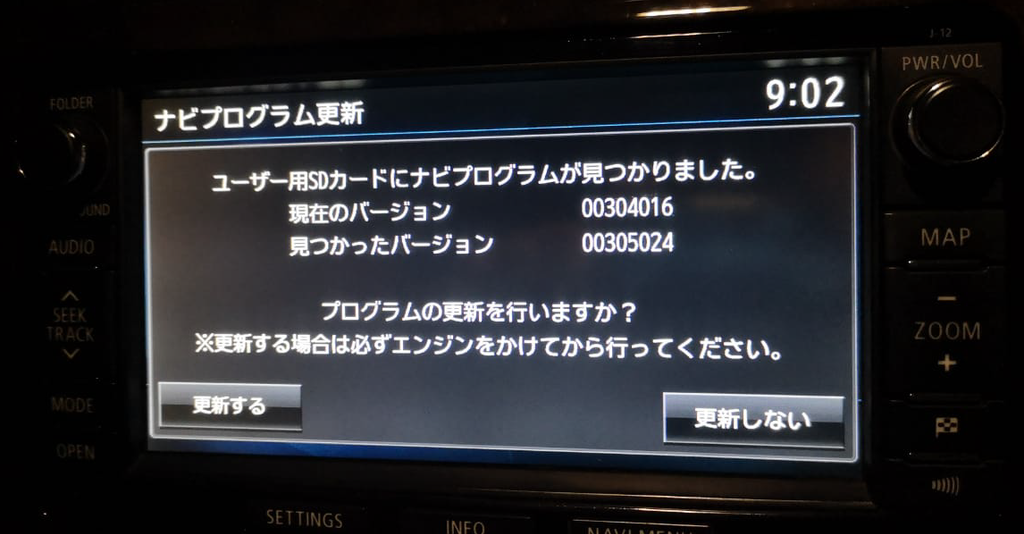
- When the Japanese update confirmation appears, press the left button, 更新する (Update). The right button, 更新しない, means Do not update.
- Allow approximately 3–5 minutes for installation. Do not switch off the vehicle, interrupt power or remove either card during the update or automatic reboot.
- The unit will restart automatically. Wait until it has fully restarted and the English menus are displayed.
- You may then remove and safely store the update card, or leave it in the USER slot. Leave the original MAP card in place.
The estimated duration is not a shutdown deadline. Do not switch off simply because five minutes have passed.
Confirmation Screen Example
Need Help?
If the expected confirmation does not appear, do not try another firmware file or move the update card into the MAP slot. Contact DASHMOD INFOTAINMENT.
If an update has already started and appears stalled or displays an error, do not attempt a reset or power cycle. Contact us for guidance.
Installation-related support is included for 30 days after purchase for emailed downloads, or 30 days from receipt or collection for courier-delivered prepared cards.
WhatsApp: +254 704 950758
Email: dashmodlabs@gmail.com